
CRM Best Practices: 14 Ways to Build a System Your Team Actually Uses

• 18 min
I am the CEO of Fively and the co-founder of DogQ. I share my thoughts about the web development industry from the point of view of a business owner and a senior engineer with 10+ years of experience.
Buying a CRM is the easy part. The hard part is making it the place where sales, marketing, and customer success teams find reliable information and know what to do next. Without agreed processes, even expensive CRM software becomes a second reporting job: deals live in spreadsheets, follow-ups disappear into inboxes, and dashboards show a version of the business nobody trusts.
That gap matters. Salesforce's 2026 State of Sales research found that sales representatives spend 60% of their working time on non-selling tasks. A CRM cannot eliminate all that work, but a disciplined implementation can reduce avoidable data entry, fragmented context, and repeated coordination.
This guide covers 14 CRM best practices, arranged in a sequence that works for both new implementations and systems that need rescuing. It also gives you an initial diagnostic, a maturity framework, a quarterly health check, and a plan for the first 30 days.
Key Takeaways
• Best for: Sales leaders, operations teams, and growing businesses implementing a CRM tool or improving a disappointing rollout.
• The recurring problem: Software is installed, but ownership, data standards, and everyday usage are inconsistent.
• The principle: Establish repeatable behavior before adding complex automations, AI scoring, or elaborate reporting.
• The order: Define outcomes → standardize records → make ownership visible → build adoption → automate → optimize.
• The result to look for: Fewer orphaned deals, faster follow-ups, more trustworthy forecasts, and smoother customer handoffs, not simply more logins.
Find Your Starting Point (Quick Diagnostic)
Not sure where to start? Match what you see in daily work to the underlying problem. The section numbers refer to the 14 practices below.
Recovering a CRM System That Didn't Stick
A failed CRM platform rollout is not the same as a fresh implementation. Employees remember wasted data entry, broken reports, and management promises that never materialized. Announcing another mandatory training session before addressing those frustrations usually makes the resistance worse.
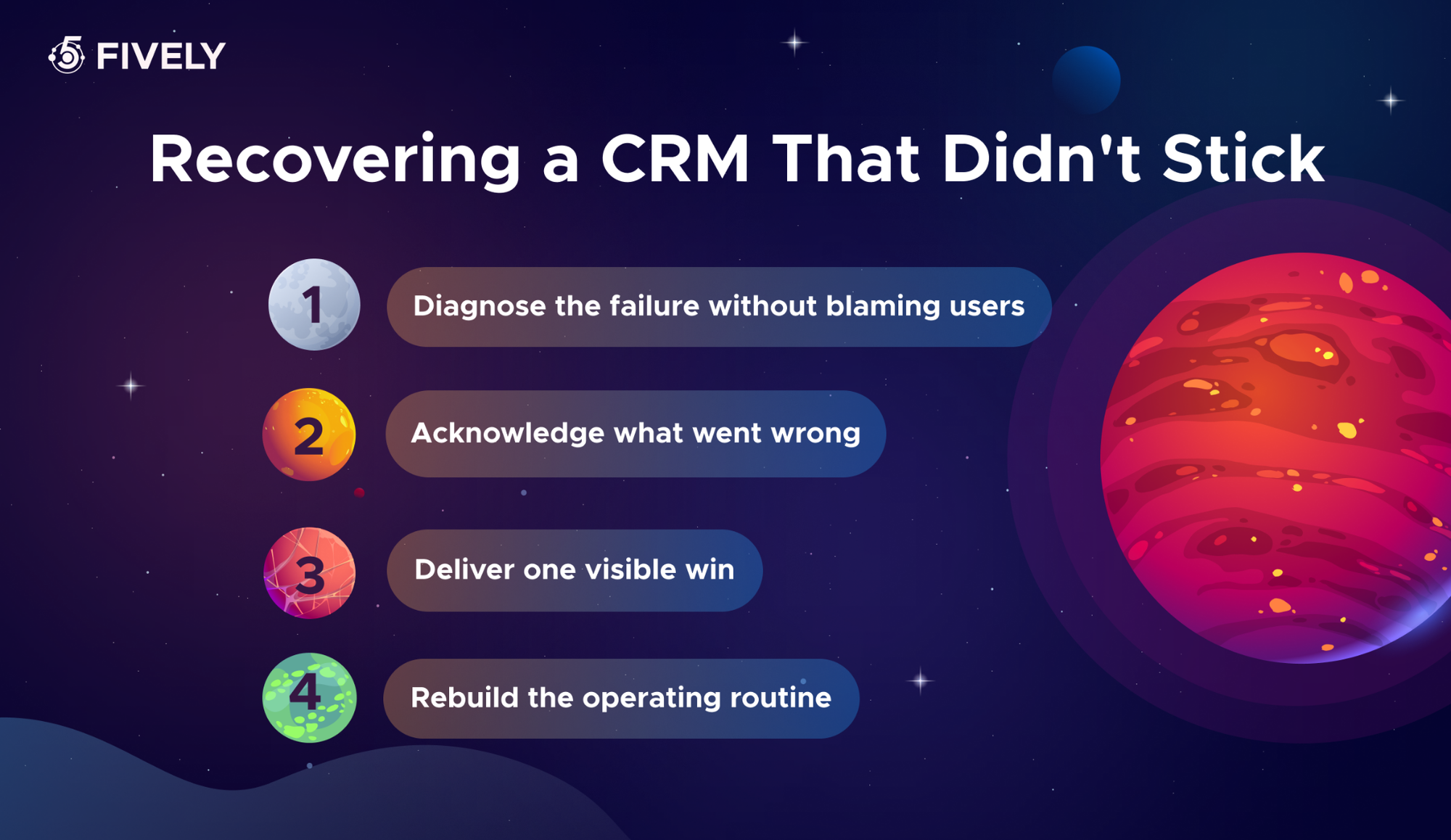
Step 1. Diagnose the failure without blaming users. Interview a few representatives, a manager, and someone from operations. Was the platform mismatched to the sales process? Were records imported dirty? Did leaders use the system only to monitor staff? Was nobody accountable for maintenance? Separate usability issues from process and trust issues.
Step 2. Acknowledge what went wrong. Tell the team what you heard, what you will stop requiring, and which specific problems will be fixed. Publish a short list of decisions. A relaunch should not pretend the previous attempt never happened.
Step 3. Deliver one visible win. Fix duplicate accounts for a priority segment, create a reliable “my deals needing action” view, or remove a redundant data-entry step. Pilot it with a small group and show the before-and-after workflow rather than presenting new dashboards.
Step 4. Rebuild the operating routine. Once users can see value, progress through Section 4 (data rules) → Section 5 (ownership and next actions) → Section 7 (adoption). Introduce more automation only after those foundations are working. Track whether the promised improvement actually lasts.
What Are CRM Best Practices (and Why Generic Advice Fails)
CRM best practices are the repeatable decisions, rules, and working habits that make customer relationship management software useful over time. They include how information enters the CRM system, who maintains it, when an opportunity moves stage, what happens after a customer call, and how teams respond when a workflow breaks.
Generic advice such as “keep data clean” or “train your sales team” is incomplete because it leaves out the operating mechanism. Who resolves two accounts with similar names? What is a qualified opportunity? How quickly must an owner assign the next action? What gets reviewed weekly? If nobody can answer, the supposed practice cannot be enforced or improved.
The more useful distinction is configuration versus behavior. Configuration makes it possible to record a next step; behavior ensures every live deal actually has one. Configuration allows automatic reminders; behavior determines when the reminder is appropriate and who handles exceptions.
Treat CRM as an operating system for customer relationships, not a contact database. A healthy CRM improves decisions made during a real workday: who to contact, what was promised, which account needs intervention, and whether a forecast is supported by evidence.
The CRM Maturity Framework: Do Things in the Right Order
A growing team often attempts advanced forecasting before it has trustworthy deal stages or tries AI personalization before customer consent is properly recorded. A maturity framework prevents that inversion. This is a practical planning model, not a vendor certification or industry-wide benchmark.
You can work on several stages in parallel, but do not let a later stage depend on data that earlier stages have not made reliable. The aim is not “CRM maturity” as a vanity label. It is fewer operational surprises, more useful customer data, and improvements that survive staff turnover.
1. Set Clear Goals and KPIs Before You Touch Settings
Start with business outcomes, not a tour of CRM features. A goal such as “improve sales efficiency” is too vague to shape implementation. “Reduce median first-response time for qualified inbound leads from eight business hours to two within 90 days” is measurable, time-bound, and actionable.
Choose no more than three initial KPIs. Useful options include lead response time, opportunity win rate, percentage of active deals with a dated next action, and customer renewal rate. Write the baseline, target, calculation, data owner, and review cadence beside each KPI. A win-rate dashboard is meaningless unless teams agree what counts as an opportunity and when it becomes won or lost.
For example, a B2B sales team can focus its first quarter on response speed rather than tracking 20 metrics. Its operations lead records the current median response time, sets a service-level agreement, and checks the weekly distribution—not just the average, which can conceal long delays.
How to apply it: Interview stakeholders; document the current process; select two or three outcome KPIs; assign owners; and review goals quarterly. Watch out for: Measuring login counts as the main success metric. Activity without better decisions is not CRM ROI.
2. Choose a CRM Solution That Fits How You Sell
The right CRM solution reflects your selling motion. A straightforward inbound pipeline with five stages needs different workflows from an enterprise organization managing account hierarchies, multiple decision-makers, recurring contracts, and regional approvals. Buying the platform with the longest feature list is rarely an effective selection strategy.
Map one actual customer journey before you compare vendors. Capture lead source, qualification criteria, deal stages, approvals, handoff to onboarding, and post-sale ownership. Then test shortlisted products against realistic tasks: Can a rep complete a call note in under a minute? Can a manager understand why a deal moved backward? Can marketing attribute a campaign without duplicate contacts?
Compare total cost of ownership, including licenses, implementation, training, integrations, custom objects, support, and migration. Ask vendors to demonstrate your workflow with sample records rather than a generic presentation. Keep an exit plan: check export formats, API limits, and the ownership of your customer data.
How to apply it: List five must-have workflows and three deal-breakers, pilot with representative users, then score fit against real tasks. Watch out for: Selecting a CRM tool based solely on executive preference or a discount that expires before the rollout finishes.
3. Build a Phased Implementation Plan (Not a Big-Bang Launch)
A company-wide switch creates too many failure points at once: imported records, permissions, reporting, integrations, and user behavior all change together. A phased rollout limits the blast radius and gives the team room to correct problems before they become widespread.
Name a business sponsor and an operational product owner. Agree on rollback criteria before launch: for example, pause the next rollout group if sync errors exceed an internally agreed threshold or critical records lack owners. Keep a change log, a place to report problems, and a weekly decision meeting during the pilot.
How to apply it: Start with one sales motion and limited integrations; validate end-to-end tasks before expanding. Watch out for: Migrating every historical note and building every automation before the first employee has successfully used the new pipeline.
4. Set Data Entry Standards and Define “Duplicate”
Clean CRM data starts with explicit definitions. Standardize required fields by lifecycle stage, naming conventions, phone formats, date formats, country values, and the rules for associating people with accounts. A mandatory field is valuable only when someone can fill it accurately at that moment. Otherwise, it produces placeholders and invented values.
Define what “duplicate” means. Two contacts may share a name but represent different people; one account may have several legitimate subsidiaries. Establish match rules using combinations of verified email, domain, company identifier, phone, and account relationship. Use human review for ambiguous merges, and preserve activity history, consent, and ownership when consolidating records.
Create an owner for data quality and set simple checks: share of active deals missing a next action, invalid emails, records without an account association, and potential duplicates awaiting review.
Salesforce reported in its 2026 survey that 74% of sales professionals were focusing on data cleansing, underscoring how directly data quality affects newer AI initiatives.
How to apply it: Publish a one-page field dictionary, validate records at entry, run a small deduplication pilot, and schedule recurring audits. Watch out for: Merging automatically on company name alone or importing stale fields because “we might need them someday.”
5. Give Every Record an Owner and a Dated Next Action
An active customer relationship should never depend on someone remembering to check their email. Each open opportunity or service-critical account needs one accountable owner, a clearly defined status, and a dated next action. Collaborators can be added, but accountability should not disappear into a shared team queue.
Use action-oriented updates. “Waiting for client” is not a next step. “Send revised pricing to procurement by November 6; confirm receipt November 9” names the task and timing. A service note might read: “Customer reported two missed cleaning visits; replacement service booked for Thursday. Operations lead to confirm completion Friday; account manager to call customer Monday.” This is an illustrative example, not a customer case study.
Build views for overdue activities, deals without next steps, unassigned inbound leads, and records whose owner is inactive. Define reassignment procedures for vacations, departures, and territory changes. In pipeline reviews, ask “What happens next, and when?” before debating forecast categories.
How to apply it: Make owner and next-action date standard on active opportunities; audit exceptions weekly. Watch out for: Creating a blanket task for every record, including inactive customers, until important reminders are buried in noise.
6. Automate the Repeatable Work with Guardrails
Automation should remove repetitive work, not conceal a broken process. Good first candidates include lead assignment, meeting reminders, renewal alerts, follow-up task creation, and notifications for stalled deals. Each rule needs a trigger, a clear owner, an expected action, and a stop condition.
A practical lead routing workflow might be: new inbound lead → check existing account and territory → assign one owner → create a task due within the agreed response window → notify the backup queue if no action is logged. Stop the sequence when the lead is disqualified, responds, opts out, or moves to another lifecycle stage. Log failures and provide a manual override.
Measure whether a workflow actually saves time. Track the number of events processed, duplicate tasks generated, exceptions, and lead response time before and after activation. Introduce AI-generated outreach only with review controls, consent checks, and limits on sensitive data. Automation cannot fix inaccurate ownership or undefined qualification rules.
How to apply it: Automate two high-volume tasks, document stopping conditions, and test edge cases before scaling. Watch out for: Infinite loops between connected tools, redundant customer messages, and automated follow-ups that continue after a complaint or opt-out.
 Services Account
7. Drive Adoption Through Value, Not Mandates
Employees use a CRM platfrom when it helps them complete their jobs. If the system makes a rep type the same customer information into three places, an executive mandate may produce compliance but not good information. Improve the workflow first: simplify forms, use email or calendar capture responsibly, offer mobile-friendly actions, and remove fields nobody uses.
Make CRM the working surface of regular meetings. Managers should open a shared pipeline view during coaching, inspect next actions during deal reviews, and use actual customer context when planning handoffs. This reinforces why accurate records matter without turning usage into an attendance contest. The adoption approach should be role-based: a sales representative needs fast activity entry; a customer success manager needs renewal and risk visibility.
Name “power users” who can give feedback and answer practical questions. Monitor adoption through outcomes such as completeness of critical fields and percentage of live deals with next steps, not merely the number of logins.
How to apply it: Interview users after the pilot, remove unnecessary steps, and show one role-specific benefit per team. Watch out for: Treating resistance as a training failure when the underlying workflow is slower than the old one.
8. Protect Context at Handoffs (Sales → CS → Support)
A closed-won deal is not the end of the customer journey. When an account moves from sales to onboarding, customer success, billing, or support, the receiving team needs more than a company name and a contract value. Missing expectations create avoidable escalations and make customers repeat themselves.
Create a structured handoff record: purchased scope, business objectives, stakeholders, promised milestones, dependencies, known risks, contract dates, communication preferences, and open commitments. Assign a receiving owner and require acknowledgment. The handoff is complete only when the next team confirms it has the information required to act.
For example, if sales promised a two-week integration review, the onboarding owner should see that commitment before the kickoff call. Link the original notes and responsible person rather than copying vague summaries into a fresh spreadsheet. Define escalation rules if the recipient does not accept the handoff by an agreed deadline.
How to apply it: Use a short required handoff template and a receiving-team confirmation step; review escalations monthly. Watch out for: Automatically changing the record owner without transferring unresolved commitments or explaining what the customer expects next.
9. Integrate CRM With Your Stack, But Test Before You Trust
CRM software rarely operates alone. Email, calendars, marketing tools, support systems, billing platforms, and product analytics may all contribute useful information. But every integration also creates another way to overwrite data, duplicate activity, or misstate the customer's status.
For each field, choose a system of record. For example, billing might own paid invoice status while the CRM owns account relationships and sales stage. Document sync direction, update frequency, conflict resolution, identity matching, failure alerts, and permissions. Do not assume a two-way sync is harmless: conflicting edits and retries can create loops or erase newer information.
Test realistic cases before launch: updated email addresses, duplicate accounts, deleted records, unsubscribed contacts, API rate limits, expired credentials, and delayed events. Build reconciliation reports and maintain a way to replay failed sync events safely.
How to apply it: Connect the highest-value system first, document data ownership, and monitor error rates after release. Watch out for: Connecting every available app merely because the CRM marketplace offers a plugin.
10. Use Analytics, AI, and Predictive Forecasting
A CRM dashboard is useful when it changes decisions. Start with definitions managers can audit: pipeline value by stage, stage conversion, deal age, response time, renewal exposure, and forecast accuracy. Segment by team and lead source only when the underlying records are consistent. Compare changes with a baseline, not with aspirational industry averages.
AI can help summarize interactions, identify accounts needing attention, suggest the next action, and rank opportunities. Predictive forecasting can combine pipeline history, close dates, deal movement, and past conversion patterns. But these outputs are estimates, not facts. Evaluate them against outcomes over time: does an AI risk flag catch real churn signals, and how often is it wrong?
Use human approval for high-impact actions, keep an audit trail, and restrict which data is sent to models. Avoid training or evaluating models on records that lack reliable consent, lifecycle, or outcome labels.
How to apply it: Stabilize reports first, pilot one narrowly defined AI use case, compare it with a simple rule-based baseline, and review errors monthly. Watch out for: Presenting confident-looking forecasts from incomplete data as guaranteed revenue.
11. Segment Customers for Personalized Engagement
Personalization works when segments describe meaningful differences in needs, timing, or value, not when they simply split a contact list into more pieces. Start with segmentation variables your organization can maintain: customer lifecycle stage, industry, account size, product usage, purchase history, renewal window, and declared interests.
Match the segment to a specific decision. A newly onboarded customer might receive educational content; a high-usage account nearing renewal might be offered an expansion discussion; an inactive trial user might need product support rather than another promotional email. Coordinate with marketing so sales outreach and automated campaigns do not contradict each other.
Set entry and exit criteria for each segment and use consent and preference data to control communications. Test segments by outcomes: reply rates, qualified conversations, renewal rates, not just open rates. Too many narrowly defined lists create operational overhead and unreliable reporting.
How to apply it: Launch three actionable segments with named owners and clear messaging. Watch out for: Lead scoring that rewards repeated clicks while ignoring fit, buying authority, or an explicit “not interested” response.
12. Build Retention Workflows, Not Just Acquisition Pipeline
If the CRM stops at “closed won,” teams miss the customer lifetime value they worked to create. Create post-sale views for onboarding milestones, product adoption, account health, contract renewals, support escalation, and expansion opportunities. Assign owners and dates just as you would for an acquisition pipeline.
A simple retention workflow could create a renewal review 90 days before contract expiry, pull the latest support history, and request a customer health check. If the account has unresolved issues, route it to customer success before sales sends an upsell proposal. Keep feedback and promised actions visible in one customer timeline.
Use churn reason codes carefully; make them specific enough to support analysis but easy enough for teams to complete. Review whether retention interventions actually improve renewal outcomes compared with similar accounts that did not receive them. Customer satisfaction surveys can add context, but they should not substitute for resolving documented problems.
How to apply it: Define a lifecycle owner after the sale, add renewal dates, and set escalation criteria for at-risk accounts. Watch out for: Triggering upsell campaigns automatically while an unresolved support case is damaging the relationship.
13. Set Access Controls and Stay Compliant
Customer data is valuable and often sensitive. Apply least-privilege access: sales reps should see what they need to manage accounts, support agents what they need to solve issues, and administrators only the scope necessary to operate the system. Use role-based permissions, multifactor authentication, audit logs, and regular access reviews. Remove access promptly when roles change or employees leave.
Privacy obligations depend on geography, the data involved, and the organization's role. Under GDPR, practices such as data minimization, lawful processing, retention limits, and appropriate security measures matter for CRM design. CCPA/CPRA can require workflows for California consumers' rights, including access, correction, deletion, and certain opt-outs. For organizations subject to HIPAA, the Security Rule covers safeguards for electronic protected health information. A CRM vendor's marketing claim is not, by itself, proof that your specific use complies with any of these frameworks.
Document consent and communication preferences, define retention and deletion policies, and verify contracts and subprocessors. Test that restricted records do not leak into exports, automations, analytics dashboards, or AI prompts. In regulated industries, involve legal and security specialists when designing workflows; this article is not legal advice.
How to apply it: Review roles, retention, consent flags, data exports, and vendor access at least quarterly. Watch out for: Giving broad administrator rights to solve workflow problems or storing secrets and sensitive notes in unrestricted text fields.
14. Review Quarterly: Health Checklist & Benchmarks
A CRM implementation is never “finished.” Quarterly reviews should combine operational metrics with a sample of real customer records. Focus on whether the system supports work reliably, not whether it meets a universal vendor benchmark—targets vary by sales cycle, industry, and company maturity.
Set internal thresholds based on a verified baseline. For example, aim to reduce active opportunities missing next actions from 30% to under 10% during the first quarter; that is an illustrative target, not a universal benchmark. Review a sample of records with the people who use them, then choose one or two workflow changes for the next cycle.
How to apply it: Publish a short quarterly scorecard with metric owners, trends, top exceptions, and improvement actions. Watch out for: Celebrating record volume while the proportion of useful, current information keeps declining.
Common CRM Mistakes to Avoid
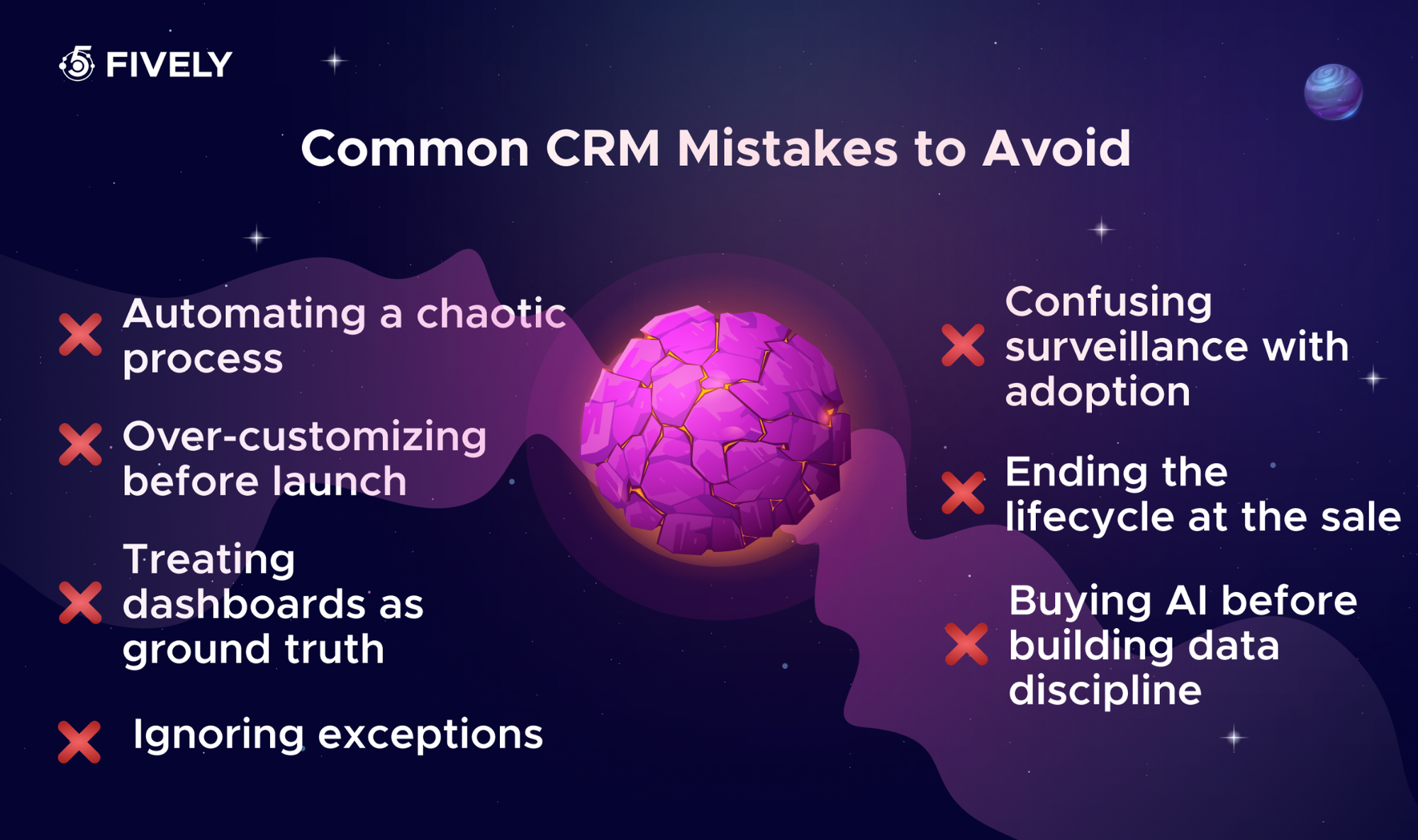
Even a good CRM strategy can fail through predictable implementation decisions. Watch for these patterns:
• Automating a chaotic process. When qualification rules are inconsistent, automation scales mistakes. Standardize the decision first;
• Over-customizing before launch. Dozens of custom fields and stages make training harder and migrations more expensive. Start with workflows that demonstrably matter;
• Treating dashboards as ground truth. A precise chart can still rely on stale, duplicated, or inconsistently defined records. Audit its inputs;
• Confusing surveillance with adoption. Mandatory logging without visible user value pushes real communication into private channels;
• Ignoring exceptions. Integrations fail, people go on leave, and customers opt out. Every workflow needs ownership and a recovery path;
• Ending the lifecycle at the sale. Acquisition reporting alone cannot reveal what drives renewals, dissatisfaction, or expansion;
• Buying AI before building data discipline. More sophisticated predictions do not compensate for missing outcomes or poorly governed customer data.
The common theme is operational ownership. Each failure becomes manageable once a specific person is responsible for identifying it, deciding what should happen, and checking that the fix worked.
Your First 30 Days: A Week-by-Week Action Plan
You do not need to rebuild the entire CRM in a month. A useful first month produces one measurable improvement and establishes routines that can scale.
At the end of the month, conduct a 30-minute review with sales, operations, and the pilot users. Ask: Which manual step disappeared? Which records still cannot be trusted? Did customers receive more timely or consistent communication? Choose the next improvement based on those answers, not on the newest feature release.
A larger business may need longer for security review, integrations, and change management. That is normal. The purpose of this roadmap is sequence, not a promise that complex CRM transformation takes only 30 days.
Conclusion
The best CRM system is not necessarily the one with the most features. It is the one your team trusts enough to use while real customer work is happening. Start with a measurable goal, clean and clearly owned records, and a consistent next-action routine. Then improve adoption, connect systems carefully, and add automation or AI only where it removes genuine friction.
If your CRM has become a patchwork of spreadsheets, manual handoffs, and unreliable reports, the problem may be the workflow as much as the software. Fively helps businesses design, customize, and develop CRM solutions around their actual operations—from integrations and role-specific interfaces to scalable customer data workflows. Explore Fively's custom CRM development services to discuss what a better-fitting system could look like.
 Services Account
Need Help With A Project?
Drop us a line, let’s arrange a discussion
Frequently Asked Questions
CRM best practices are the repeatable processes that keep customer data accurate, sales activities visible, and team collaboration consistent. They cover goal setting, data standards, ownership, automation, adoption, handoffs, analytics, and security.
Establish a clear owner and a dated next action for every active record. This simple habit gives the CRM practical value, exposes stalled work, and makes handoffs easier—provided the underlying customer data is trustworthy.
Validate critical fields during entry, review duplicates and missing next actions weekly, and run deeper audits monthly or quarterly. High-volume systems may need automated daily checks; the right cadence depends on how quickly records change.
Small businesses should prioritize simple pipelines, fast adoption, and a handful of integrations. Enterprises usually need more formal governance, account hierarchies, access rules, cross-team handoffs, and change control. Both need clean data and clear ownership.
AI can summarize interactions, suggest next steps, detect patterns, and support forecasting. It works best after data quality, permissions, and workflows are reliable, with human oversight and clear evaluation of errors and business impact.


