
CRM Features and Functions: What Your Business Actually Needs in 2026

• 13 min
I'm a content specialist at Fively keen on writing fresh articles that can help out business and tech specialists. I love to conduct research, hold interviews, and spotlight sophisticated tech issues.
A CRM can be a searchable address book, a revenue engine, or an expensive place where deals go to be forgotten. The difference lies less in the number of tools on the pricing page than in the work those tools actually help people do.
Understanding CRM features and functions makes it easier to separate the essentials from the upgrades. This guide explains the business outcomes a customer relationship management system should deliver, the capabilities worth implementing first, and the signals that justify more sophisticated CRM software. We also look at where AI fits in 2026—and where it still needs human supervision.
Key Takeaways
- CRM features are tools; CRM functions are outcomes. A pipeline is a feature. Moving qualified opportunities toward a sale is a function.
- Seven core functions connect customer data, sales, marketing, service, automation, analytics, and collaboration.
- Ten must-have features give most teams a reliable foundation before they invest in complex workflows.
- Ten advanced features become valuable when specific operational problems start costing time, revenue, or customer trust.
- AI is a layer, not a replacement for the basics. It can score leads, draft content, and execute controlled tasks, but clean data and permissions still matter.
CRM Features vs. CRM Functions: What’s the Difference?
CRM features are the capabilities people use inside a platform: contact records, lead scores, pipeline boards, email integrations, and dashboards.
CRM functions are the jobs those capabilities enable: organizing customer information, converting leads, improving service, forecasting revenue, and coordinating teams.
Consider a follow-up reminder. The reminder is a feature; making sure no promising lead goes unanswered is the function. One function often depends on multiple features, while a single feature can serve several functions. This distinction matters when comparing vendors: buying another dashboard will not improve forecasting if your team rarely updates deal stages.
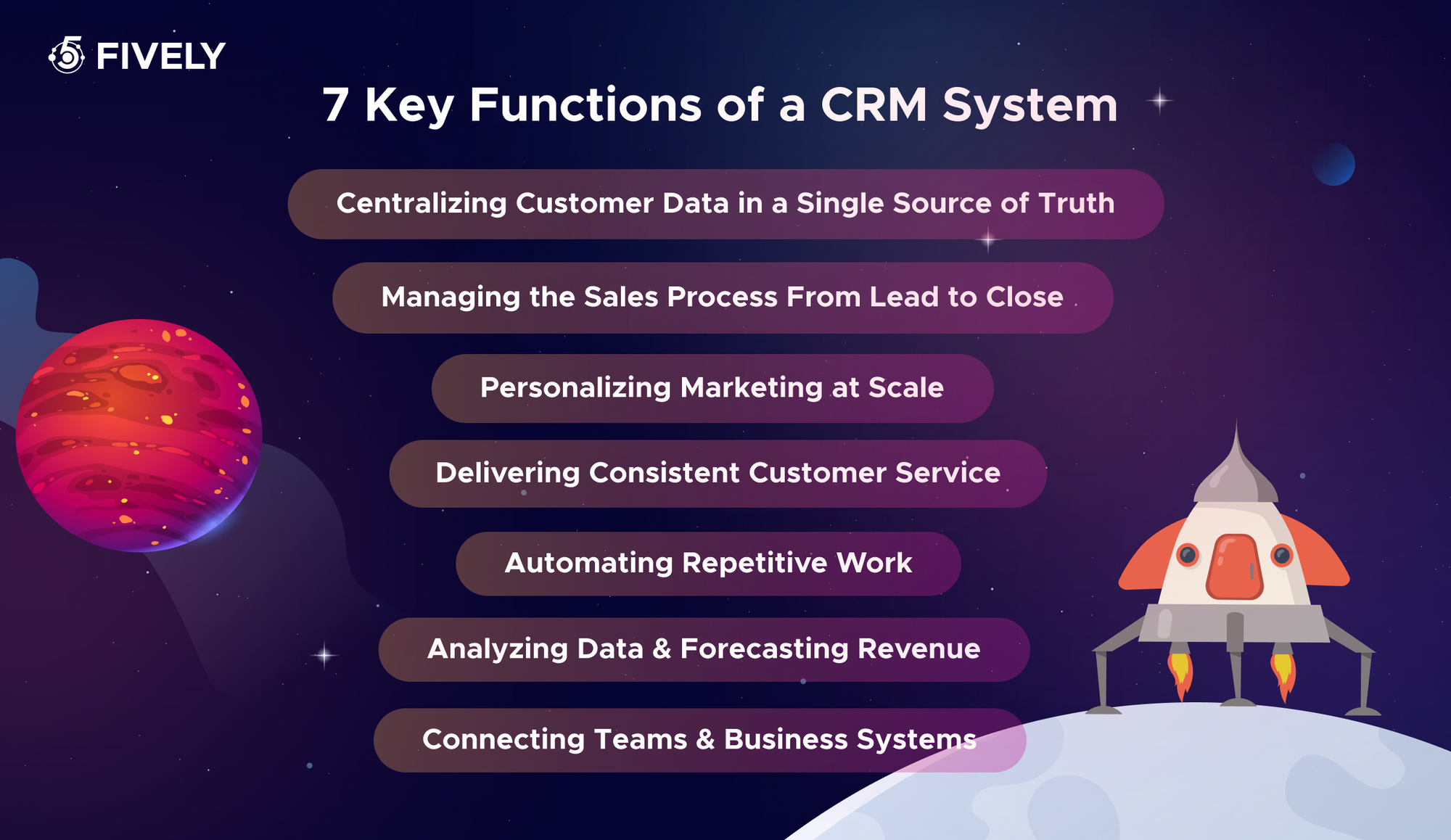
7 Key Functions of a CRM System
1. Centralizing Customer Data in a Single Source of Truth
A CRM brings contacts, company accounts, purchase history, preferences, support issues, and conversation notes into connected records. Instead of searching across inboxes and spreadsheets, authorized employees can see the context behind a relationship. Centralization only works when duplicate handling, data ownership, and update rules are clear; an untidy shared database is still untidy.
2. Managing the Sales Process From Lead to Close
A CRM defines how an inquiry becomes a qualified lead, an opportunity, and eventually a customer. It assigns owners, tracks next steps, highlights stalled deals, and creates a consistent handoff to account management. Managers can see whether weak results come from a shortage of leads, slow follow-ups, or low proposal acceptance—not just a disappointing monthly total.
3. Personalizing Marketing at Scale
Marketing teams use customer behavior, purchase history, and lifecycle stage to build useful segments. A first-time visitor might receive an educational sequence, while a returning customer gets relevant product updates. The goal is not to send more messages; it is to send timely messages to people who have a reason—and appropriate permission—to receive them.
4. Delivering Consistent Customer Service
When service agents can see earlier conversations, orders, and open cases, customers do not have to start from zero whenever they contact the business. Routing and escalation rules also keep requests moving. A useful CRM preserves context across chat, email, and phone even when different teams handle each interaction.
5. Automating Repetitive Work
The system can assign incoming leads, schedule follow-ups, update lifecycle stages, create tickets, and notify colleagues without somebody copying information between tools. This is especially relevant because Salesforce’s 2026 State of Sales research reports that the average seller spends only 40% of their time selling. Automation should remove avoidable admin work while keeping exceptions visible.
6. Analyzing Data and Forecasting Revenue
CRM platform analytics translates activity into decisions: conversion rates by stage, average deal age, acquisition sources, service response times, and expected revenue. Forecasting combines deal value, stage, close date, and sometimes historical win patterns. Reliable predictions require consistent definitions and regular updates; no model can rescue missing opportunities.
7. Connecting Teams and Business Systems
A relationship does not end at the sale. CRM integrations connect marketing tools, communication channels, accounting, ERP, and service systems so information can follow the customer journey. Shared ownership and permission-aware views reduce conflicting answers, duplicate outreach, and awkward handoffs between departments.
How These Functions Map to Operational, Analytical, and Collaborative CRM
These are complementary approaches, not necessarily three separate products. The operational, analytical, and collaborative CRM distinction helps explain where each function creates value.
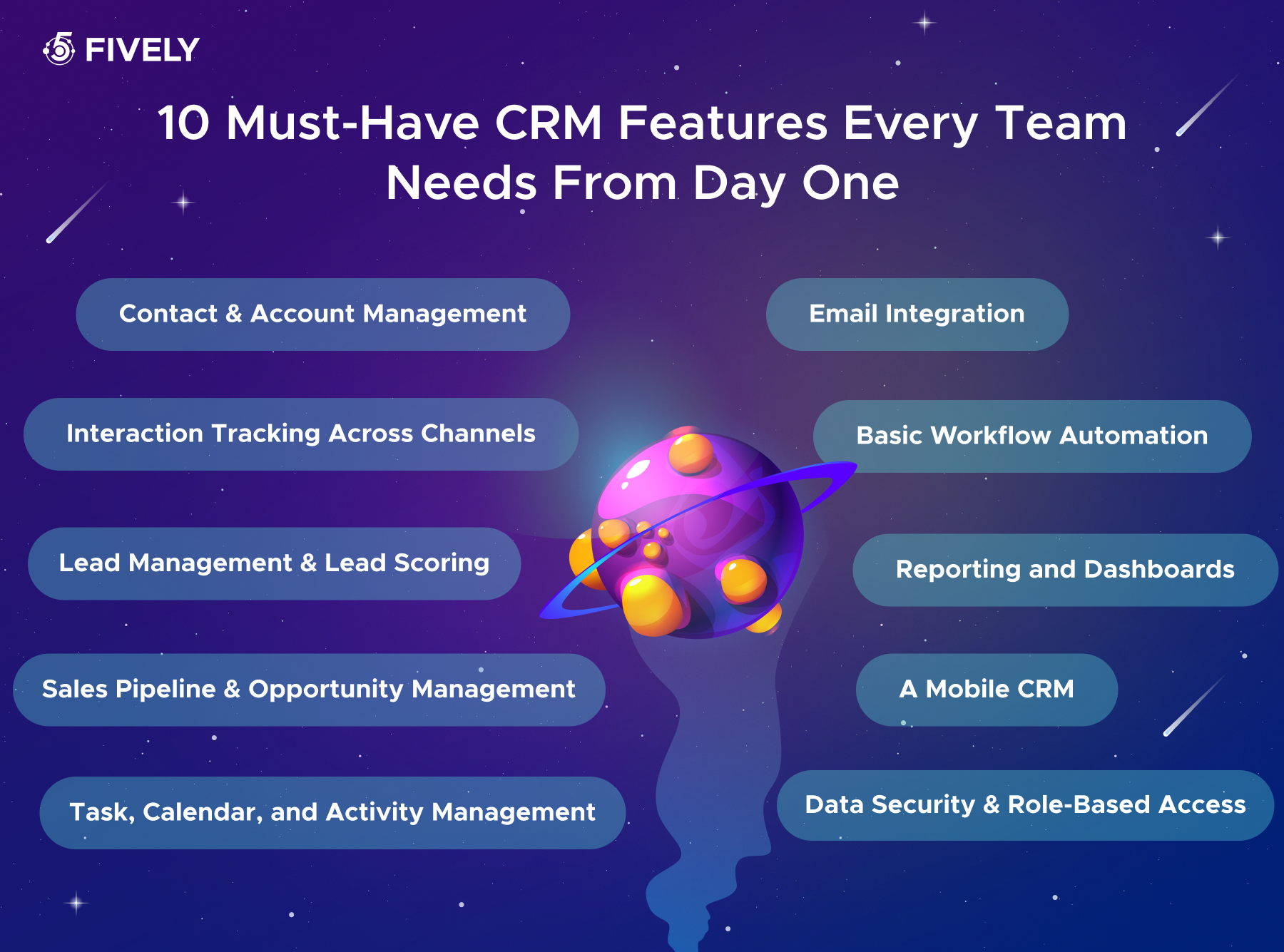
10 Key CRM Features for Your Business Every Team Needs From Day One
The right baseline is not the largest feature bundle. It is the smallest dependable set that supports daily work, protects customer information, and creates data you can trust. Start with these ten CRM features, then configure them around the actual way your team sells and serves.
1. Contact and Account Management
Store people and organizations separately but connect them through roles and relationships. Useful fields include contact details, company size, owner, lifecycle stage, and communication preferences. Add duplicate detection, import validation, and record ownership early; they prevent painful cleanup when your customer base grows.
2. Interaction Tracking Across Channels
Log calls, emails, meetings, notes, and relevant chat conversations against the same account or contact. A chronological activity feed lets a new colleague understand what was promised without interrogating the previous owner. Confirm whether call recordings and message histories sync automatically or require paid add-ons.
3. Lead Management and Lead Scoring
Capture inquiries from forms, referrals, events, or inbound email; assign owners; and flag those requiring attention. Simple scoring can begin with explicit rules—for example, points for a relevant industry, a requested demo, or a matching company size. Treat scores as prioritization aids, not proof of buying intent, and review them against actual conversions.
4. Sales Pipeline and Opportunity Management
Make progression visible with defined stages such as New → Qualified → Discovery → Proposal → Negotiation → Closed Won/Lost. For every opportunity, track amount, expected close date, owner, next action, and loss reason. Require evidence for stage changes; moving deals forward just to make a report look healthy defeats the purpose.
5. Task, Calendar, and Activity Management
Follow-up tasks, meeting schedules, deadlines, and reminders should sit beside the records they concern. Shared visibility helps managers redistribute work when someone is away. Look for recurring tasks, sensible notifications, and two-way calendar syncing rather than a separate task list nobody opens.
6. Email Integration
Connecting business email lets people send or log correspondence from the CRM and view conversations in context. Templates and tracked outreach can save time, but privacy settings are essential: confidential internal emails should not automatically become visible to the entire sales organization. Test mailbox permissions and the behavior of shared inboxes.
7. Basic Workflow Automation
Start with predictable if-then rules: route a website inquiry by region, create a follow-up when a deal enters the proposal stage, or alert an owner when a ticket becomes overdue. Keep rules documented and provide a manual override. Ten dependable automations usually beat fifty fragile ones.
8. Reporting and Dashboards
Choose a handful of metrics teams can act on: lead response time, stage conversion, open pipeline value, win rate, and overdue activities. Give employees operational views and leaders aggregate views. Before adopting a template dashboard, agree on definitions—for instance, whether win rate counts opportunities created or opportunities closed during a period.
9. Mobile CRM
Employees should be able to retrieve accounts, update deals, add notes, and complete tasks away from their desks. Mobile availability alone is not enough: test search speed, editing, notifications, and offline access on real devices. Offline editing is not universal, and synchronization conflicts deserve particular attention.
10. Data Security and Role-Based Access
A CRM holds commercially sensitive information and often personal data. Look for role-based permissions, multifactor authentication, encryption, audit logs, and export controls. Follow least-privilege principles so, for example, a sales rep can update assigned opportunities without viewing every customer’s financial information. Access control deserves the same scrutiny as the sales interface.
10 Advanced CRM Funstions and Features to Add as You Grow
Advanced does not mean inherently better. These capabilities pay off when team size, process complexity, or the cost of manual work makes a simpler setup insufficient.
1. Advanced Workflows and Approvals
Multi-step logic can route exceptions, enforce thresholds, and create an auditable approval trail. A discount above 15%, for example, might require a sales manager’s approval; above 25%, finance joins the process. Those numbers are illustrative—your thresholds should reflect margins and authority limits.
2. Marketing Automation and Campaign Management
Build segmented, multi-touch journeys with branching rules, lead nurturing, attribution, and unsubscribe handling. A contact who books a demo should leave the generic nurture sequence automatically. This feature becomes valuable when campaigns span channels and manual list management causes delays or mistakes.
3. Customer Service, Case Management, and Omnichannel Inbox
Unify requests from email, chat, social, and phone into cases with clear ownership, service-level targets, priority, and escalation. An omnichannel inbox makes it possible to answer a customer once, not independently from three queues. Knowledge bases and self-service portals can reduce repetitive inquiries.
4. Sales Forecasting
Forecasting tools aggregate open opportunities into scenario-based projections and compare predictions with actual revenue. Weighted forecasting often multiplies opportunity value by an estimated probability, but stage probabilities need calibration against your own sales history. Review forecast error by team and quarter instead of treating a single prediction as certain.
5. Quotes, Documents, and CPQ
Configure-price-quote (CPQ) workflows guide sellers through product options, pricing, discounts, and approvals. Quote templates and e-signature integration reduce copy-paste errors. This matters most when products have dependencies, bundled pricing, or customer-specific commercial terms that cannot safely live in spreadsheets.
6. Integrations and Open API
A documented API, webhooks, and reliable connectors connect the CRM solution with billing, ERP, ecommerce, or product systems. Evaluate authentication, rate limits, retry policies, error logs, and which application owns each field. A shallow one-way sync can create more confusion than no integration at all.
7. Customization and No-Code Configuration
As teams diversify, they may need custom objects, fields, page layouts, pipelines, and approval forms. No-code configuration allows administrators to adapt processes without requesting a release for every change. However, uncontrolled customization increases training and maintenance costs; use naming conventions and change reviews.
8. Multi-Language and Multi-Currency Support
International operations need localized interfaces, regional formats, exchange-rate handling, and reporting in a consistent base currency. Ask whether historical transactions preserve original rates and whether country-specific tax or address rules require integrations. Translation alone is not multinational readiness.
9. Field Service Management
Businesses that send technicians on-site may need dispatching, appointment windows, route planning, work orders, and asset histories. Matching assignments to skills, availability, and location reduces coordination overhead. A field app should capture service notes and parts used even when connectivity is poor.
10. Sandbox and Testing Environments
A sandbox is a safe place to test new automations, permissions, integrations, and data models before touching production. It should support representative—but properly protected—test data and a repeatable deployment process. This becomes critical once a configuration mistake could block invoices, alter thousands of records, or trigger unwanted customer messages.
When to Add Advanced Features: 10 Signals You’ve Outgrown the Basics
Upgrade in response to a measurable failure, not a sales demo. The thresholds below are diagnostic examples, not universal industry benchmarks.
A useful decision rule: define the problem, measure its cost, pilot the smallest solution, and reassess adoption after 30–60 days. Sometimes the fix is better training or cleaner data, not another paid CRM module.
AI-Powered CRM Features in 2026
AI now runs across both basic and advanced CRM platform functionality rather than forming a separate tier. Salesforce’s current CRM feature overview describes predictive insights, generative content, and agentic workflows. The practical options include:
- Predictive lead scoring: Machine-learning models rank leads or opportunities using past outcomes and current engagement. Check for explainable signals, drift monitoring, and enough relevant historical data; a score without context can misdirect reps.
- Generative content: Assistants draft follow-up emails, call summaries, knowledge articles, and product descriptions. Human review remains important for promises, pricing, personal details, and brand voice.
- AI agents: With predefined permissions, agents can research an account, propose record updates, arrange a meeting, or triage routine inquiries. Use approvals for high-impact actions and track what the agent did. Salesforce documents examples of both agent-driven suggestions and predictive opportunity scores.
- Automatic cleanup and enrichment: AI can suggest missing fields, spot possible duplicates, classify incoming messages, and standardize inconsistent entries. Sensitive enrichment sources, consent, and false merges require scrutiny.
- Sentiment and conversation insights: Conversation analysis can flag objections, recurring service complaints, or accounts that may need attention. These signals are imperfect and should inform, not replace, human judgment.
The implementation rule: establish data quality, permission boundaries, auditability, and measurable success criteria before handing an agent access to customers. For risk-management practices, see the NIST AI Risk Management Framework resources.
CRM Features by Department: Sales, Marketing, and Service
A shared CRM should not mean an identical dashboard for everyone. Organize views around decisions each department makes daily.
Define a common customer lifecycle and shared terms, then let each team customize its working view. Marketing’s qualified lead must mean the same thing to sales when ownership changes.
CRM Feature Checklist: 10 Questions to Ask Vendors
Ask for a live demonstration using your own realistic workflows, not just a tour of attractive screens.
- Can we import records and merge duplicates automatically? Request a sample migration with messy historical data and confirm how conflicts are resolved.
- Which features are included in our plan? Check per-seat costs, API quotas, storage limits, premium AI usage, and support charges.
- Does it integrate with our existing systems? Test two-way syncing with email, calendars, finance, and ERP, including failure handling.
- Can admins change fields and workflows without code? Ask to watch a nontechnical user make and reverse a simple change.
- How granular are permissions and audit logs? Verify object-, field-, and record-level access and who can export data.
- What can the mobile app do offline? Test editing, attachments, and conflict resolution without a signal.
- Which AI capabilities are included? Clarify data sources, retention, model permissions, human approval, and usage-based pricing.
- Is there a sandbox? Ask how configuration changes move from testing into production.
- Which security and legal requirements can you support? GDPR, CCPA, HIPAA, and SOC 2 are different obligations or assurance frameworks—not interchangeable certifications. Request the evidence relevant to your use case.
- What support is actually covered? Confirm channels, response targets, onboarding, documentation, and time-zone coverage.
 Usevalad Ulyanovich
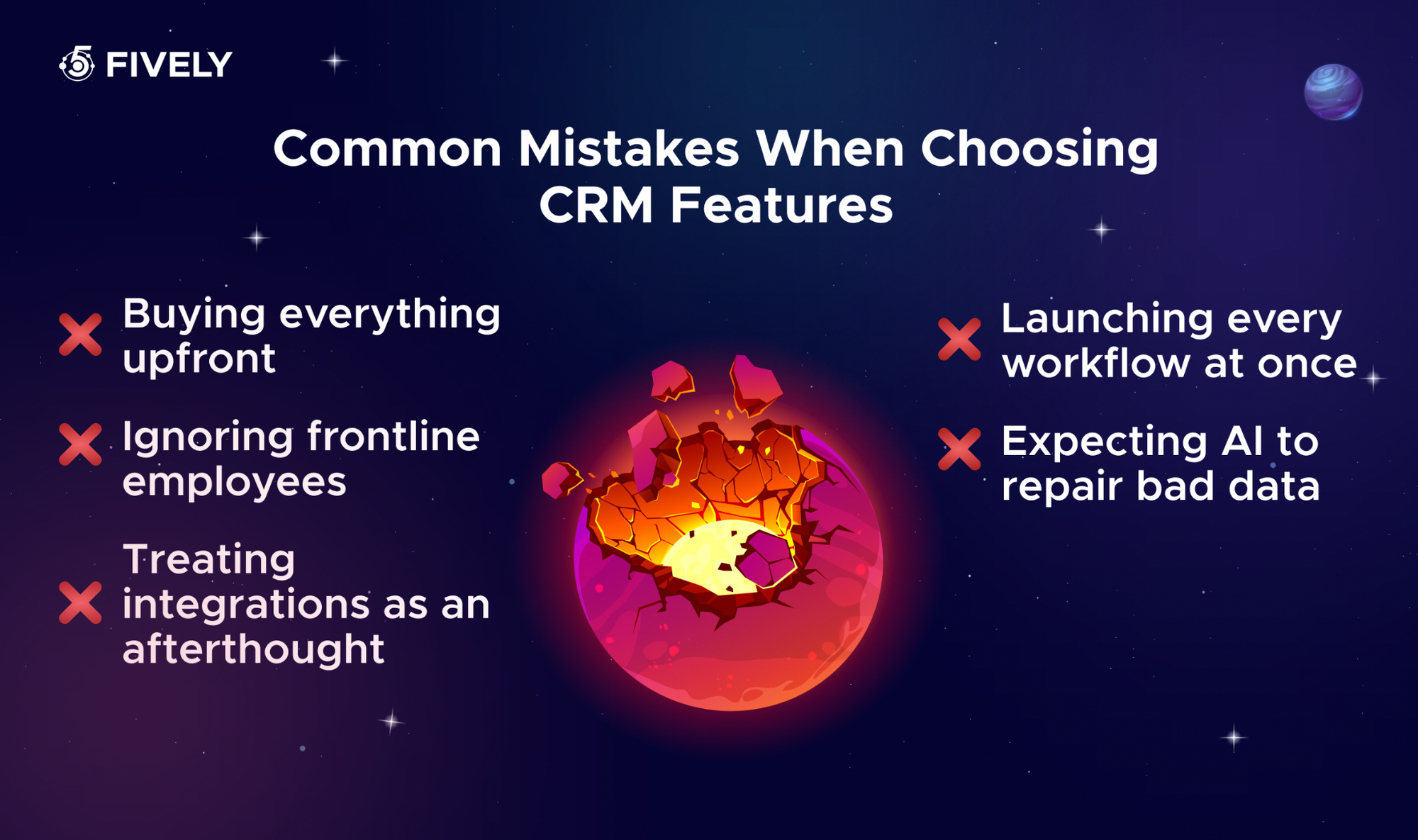
Common Mistakes When Choosing CRM Features
- Buying everything upfront. A feature-rich plan is poor value when half the team still uses spreadsheets. Pay for capabilities tied to specific workflows and measurable outcomes.
- Ignoring frontline employees. Leaders may love forecasts, but reps and agents need fast search, simple data entry, and practical mobile access. Include real users in product trials.
- Treating integrations as an afterthought. Map data flows and ownership before signing. Otherwise, the CRM platform becomes one more silo beside your ERP and help desk.
- Launching every workflow at once. Roll out contact data, a consistent pipeline, and basic reporting first. Add automations after people understand the process they automate.
- Expecting AI to repair bad data. Poor records generate poor recommendations at greater speed. Fix duplicates, missing fields, permissions, and governance before scaling AI features.
Conclusion
The best CRM is not the one with the longest feature list. It is the one that helps your team remember important details, move work forward, and make better decisions without introducing unnecessary friction. Begin with the ten essentials, use operational signals to justify advanced tools, and treat AI as an accountable extension of your processes.
If off-the-shelf software forces your team into awkward workarounds, a tailored solution may be worth exploring. Fively’s custom CRM development services cover business analysis, data migration, integrations, design, and development—so the system can match the way your business actually works.
 Services Account
Need Help With A Project?
Drop us a line, let’s arrange a discussion
Frequently Asked Questions
Core customer relationship management features include contact and account management, interaction history, lead tracking, opportunity pipelines, tasks, email integration, workflow automation, reporting, mobile access, and permission controls. Growing companies may add marketing journeys, service cases, CPQ, forecasting, integrations, or AI capabilities.
At the highest level, a CRM solution helps a business organize customer information, manage customer-facing work, and analyze relationships and performance. These map broadly to collaborative, operational, and analytical CRM. In daily practice, they support sales, marketing, and customer service together.
Features are individual tools inside CRM software, such as a dashboard or a lead score. Functions are the business tasks or goals those tools support, such as understanding sales performance or prioritizing outreach. Evaluate functions first, then choose features that demonstrably deliver them.
Start with clean contact records, a simple pipeline, tasks and reminders, email integration, basic reporting, and secure access. Add lightweight automation once the team has a repeatable process. Ease of use and dependable integrations are usually more valuable than enterprise-grade complexity.
AI can prioritize prospects, summarize conversations, generate drafts, identify potential data issues, and automate approved steps. It is moving CRM from passive recordkeeping toward proactive assistance. Its value still depends on accurate data, clear accountability, appropriate permissions, and human oversight.
Businesses need a CRM system to organize customer data, streamline sales processes, and build stronger relationships with their audience. Instead of juggling spreadsheets, emails, and disconnected tools, teams can manage leads, track interactions, automate repetitive tasks, and monitor performance in one place. A well-implemented CRM helps businesses improve customer experience, increase sales efficiency, and make smarter, data-driven decisions as they grow.


