
React vs React Native: Web, Mobile or Both in 2026?

• 21 min
AI enthusiast and senior full-stack developer with a product mindset. I turn complex requirements into state-of-the-art solutions and connect engineering decisions with real user and business needs.
“React vs React Native” sounds like a contest between rivals. It is not. React Native is React: the same components, the same hooks, the same way of thinking about state. What differs is where the result runs, and that single difference decides almost everything else, from how you style a button to how you ship a bug fix.
So the useful question is not which one is better, it is whether your product belongs on the web, on phones, or on both, and what each path costs. This React vs React Native comparison answers that with dated figures from primary sources. Start with the short version.
Key Takeaways: React vs React Native
- They are one technology aimed at two places. React Native is React rendered to native iOS and Android views instead of the browser’s DOM.
- The “bridge” is gone. Since version 0.82 in October 2025, React Native runs entirely on the New Architecture, with Hermes V1 as the default engine. Current versions are React 19.3 and React Native 0.87.
- Release speed is the biggest practical difference. React ships the moment you deploy. React Native passes App Store and Google Play review, with over-the-air updates for JavaScript-only fixes.
- You can share a lot, but not everything. Types, API clients and business logic share cleanly in a monorepo; interface code stays per platform unless you adopt React Native for Web.
- AI is shifting the economics. AI builders default to React and Expo, while Shopify’s 2026 move back to native shows AI narrowing the cost of two codebases for large teams. For startups, one React Native codebase is still cheaper to run.
- Cost depends on region, not framework. Expect roughly $25–60 per hour in Asia to $100–200+ in North America for both, with a premium for deep native iOS and Android expertise.
React and React Native at a Glance
What React Is
React is a library for building user interfaces out of components. Meta open-sourced it in 2013, and its central idea has aged well: you describe the interface for a given state, and React works out the minimum changes needed, the idea popularly called the Virtual DOM.
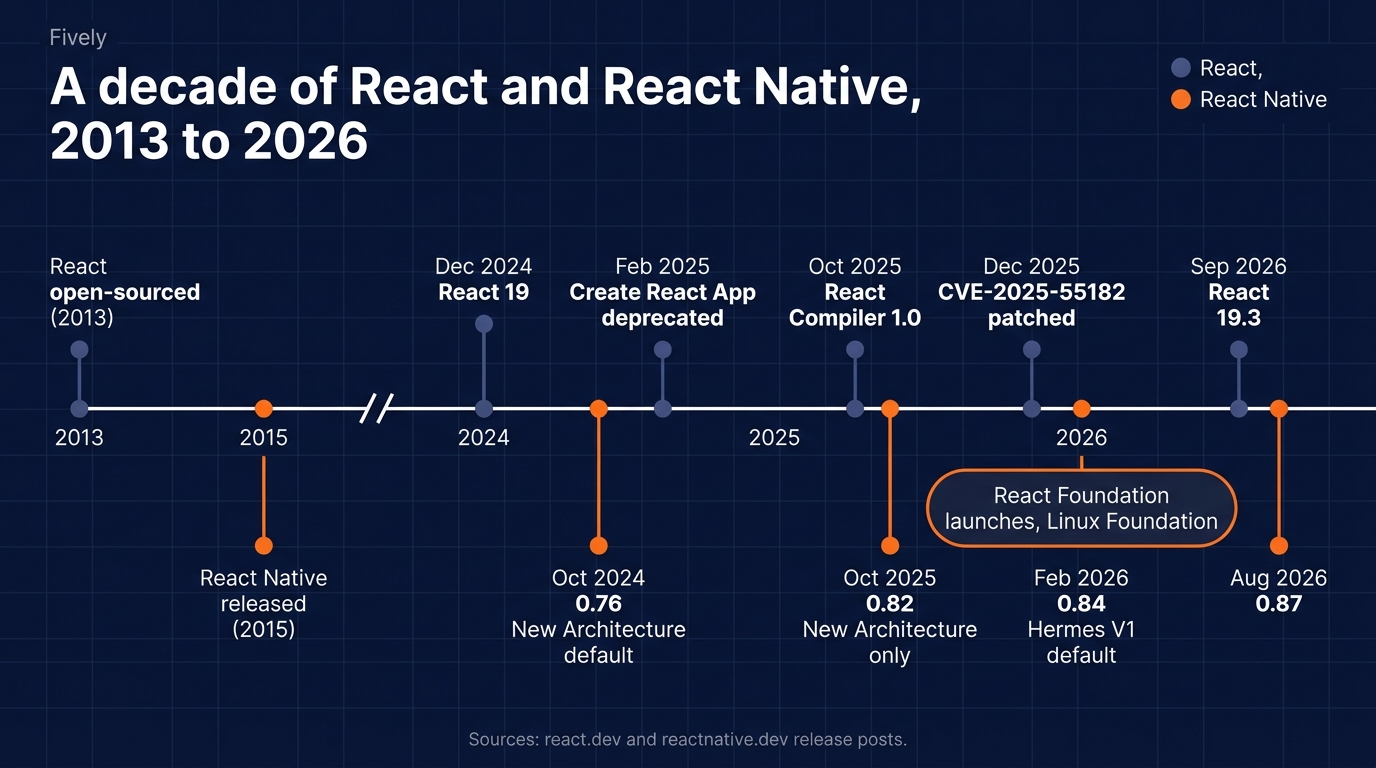
On the web, those changes land in the Document Object Model through react-dom. React has grown well beyond a view library. Server Components let parts of the tree render on the server, and React Compiler 1.0, released on 7 October 2025, automates most manual memoisation. On 14 February 2025, the team deprecated Create React App and now points new web development projects to frameworks such as Next.js and React Router. Since 24 February 2026, React has been owned not by Meta but by the React Foundation, hosted by the Linux Foundation.
What React Native Is
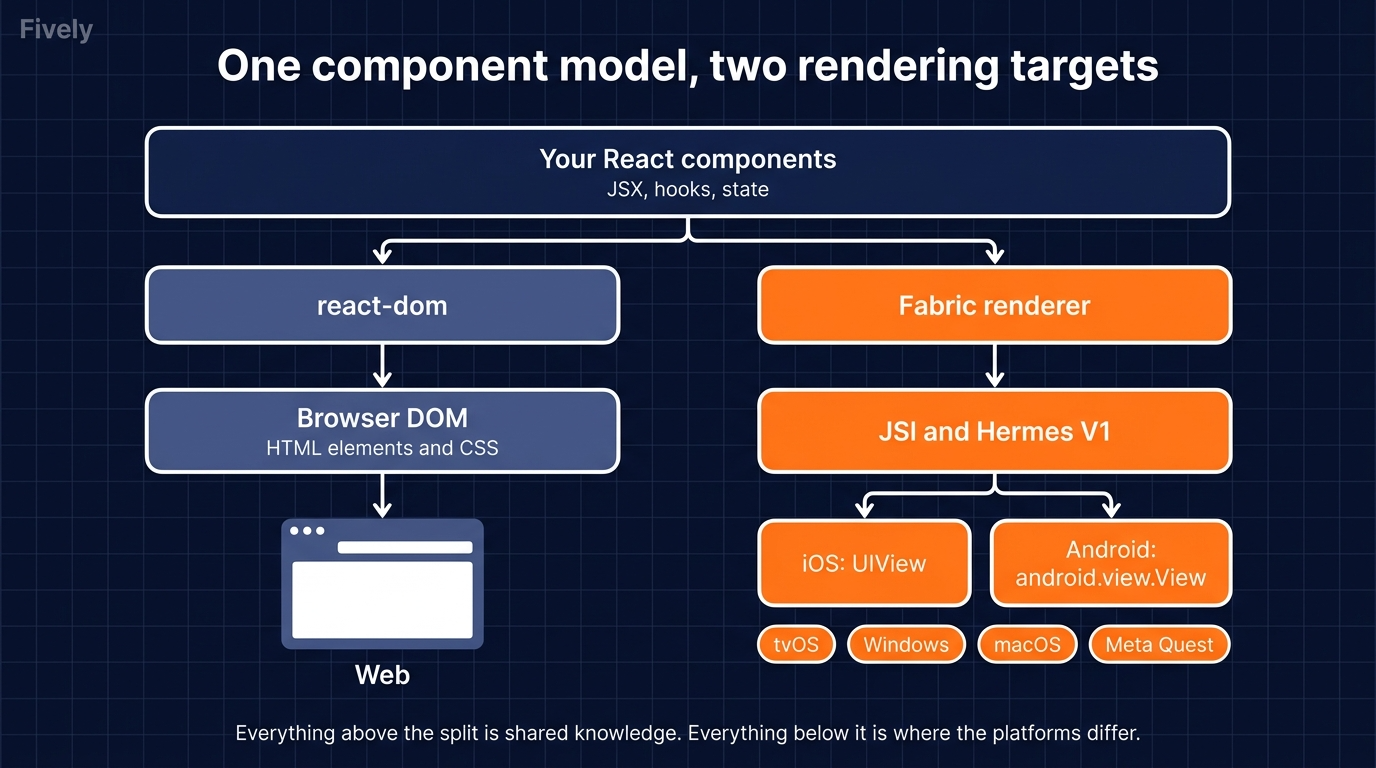
React Native takes that same model and points it at a different target: it is React’s route into cross-platform mobile development. Released by Meta in 2015, it renders components not to HTML but to genuine native views: a
The official documentation is now explicit about how to start: “if you’re building a new app with React Native, we recommend using a Framework”, and it names Expo. Expo SDK 57, released on 30 June 2026, is the current stable line. React Native moved to the React Foundation alongside React, and its reach keeps widening: in February 2026 it officially came to Meta Quest headsets.
Same component model, different output. Everything in the comparison below follows from that one split.
React vs React Native: Detailed Comparison
Below you will find ten criteria, each with the evidence and a verdict, so you can see the reasoning rather than take it on trust.
1. Platform, Rendering and Output
React renders to the browser. That gives you instant distribution through a URL, no installation, no store approval, and pages search engines can index with server-side rendering. It also gives you the browser’s limits: restricted access to hardware, weaker background execution and an interface that feels like a website however polished it is.
React Native renders to the operating system. Scroll physics, text input, navigation gestures, and accessibility come from the platform itself rather than from a web imitation of them. Native APIs are within reach: camera, biometrics, push notifications, background location, Bluetooth. The cost is that you now ship binaries through app stores and support a matrix of devices and OS versions.
Verdict: React for anything that should live at a URL, especially products that depend on search. React Native when the product belongs in someone’s pocket and needs to behave like a real app. This criterion alone settles the choice for most projects.
For example, Meta uses React to power Instagram’s web experience and React Native for its Facebook Ads Manager mobile app, demonstrating how each technology serves different platforms and user needs.
2. Architecture: From the Bridge to the New Architecture
How React Native turns components into native views has changed more in the last two years than in the previous eight, and much of what is written about it online is now wrong.
For most of its life, React Native used an asynchronous bridge: JavaScript and native code exchanged serialised JSON messages, which made frequent updates expensive and synchronous behaviour impossible. The New Architecture replaces that. The JavaScript Interface (JSI) lets JavaScript hold direct references to C++ objects and call native code synchronously. TurboModules load native modules lazily, only when first used. Fabric, the new renderer, keeps the view hierarchy as an immutable tree, which allows rendering on several threads and supports React’s concurrent features such as Transitions and Suspense.
The rollout is complete. The New Architecture became the default in React Native 0.76 on 23 October 2024. Version 0.82, released on 8 October 2025, runs entirely on it, and 0.84, on 11 February 2026, made Hermes V1 the default engine and removed legacy architecture components on both platforms. The State of React Native 2025 survey, with 3,501 responses, put New Architecture adoption at 80%.
Verdict: A clear break with the past. If an article, a vendor or a candidate describes React Native in terms of “the bridge”, their knowledge is at least a year out of date, which is a useful test in itself.
Shopify migrated its Shopify Mobile and Point of Sale apps to React Native’s New Architecture, achieving approximately 10% faster app launches on Android and 3% on iOS while supporting millions of merchants.
3. Performance
An architecture is only worth rewriting if users can feel the difference, so it is fair to ask what the numbers show.
On the web, the most significant recent gain is React Compiler. Meta reported that on the Meta Quest Store it improved initial loads and cross-page navigations by up to 12% and made certain interactions more than 2.5 times faster, with memory use unchanged. The compiler works in React Native too.
On mobile, Hermes compiles JavaScript to bytecode at build time, which the documentation says brings faster start-up, lower memory use, and smaller apps than JavaScriptCore. The 0.76 release also cut Android app size by about 3.8 MB, roughly 20%. For Hermes V1, the team claims “measurably better JavaScript performance” but has published no benchmark figures yet.
Real-world data says more than release notes. When Shopify moved Shopify Mobile and Point of Sale to the New Architecture in 2025, launch improved by about 10% on Android and 3% on iOS. The ceiling is still native: when Shopify rebuilt its Shop app in Swift and Kotlin in 2026, start-up fell from 3,200 to 2,466 ms on iOS and from 4,433 to 2,233 ms on Android, though reviewers noted the old app had not yet migrated to the New Architecture.
Verdict: React is fast enough for virtually any web product, and faster with the compiler. React Native delivers native-grade performance for the large majority of apps. For start-up-critical or hardware-heavy apps, native still sets the ceiling.
In 2026, Discord worked with Margelo to optimize its React Native Android app, reducing animation jank by 26% through improvements to Reanimated and the New Architecture.
 Services Account
4. Styling and UI Components
Performance is felt in motion; the other thing users notice first is how the interface looks, and here the two stacks part ways at the first line of markup.
React on the web inherits the whole CSS ecosystem: media queries, CSS modules, Tailwind and component libraries by the hundred.
React Native has no CSS and no HTML. Styles are JavaScript objects, layout is Flexbox computed by the Yoga engine, and there is no cascade: every component is styled explicitly. Libraries such as NativeWind bring Tailwind-style utility classes across, which narrows the gap for web developers. Components are different too: <View> and <Text> rather than <div> and <p>, and platform conventions, such as iOS navigation bars and Android’s back behaviour, matter in ways a website never has to consider.
Verdict: React for the richest styling ecosystem and design-system tooling. React Native is productive once the team accepts that mobile UI is its own discipline, not a smaller website.
Atlassian uses its React-based Atlaskit design system to maintain consistent interfaces across products like Jira and Confluence, while incident.io uses NativeWind to bring Tailwind-style styling to its React Native mobile app.
5. Navigation and Routing
Screens that look right still have to connect, and navigation is where web and mobile habits differ most.
The web navigates by URL. React Router and Next.js map addresses to pages, and the browser supplies history, bookmarks and deep links for free.
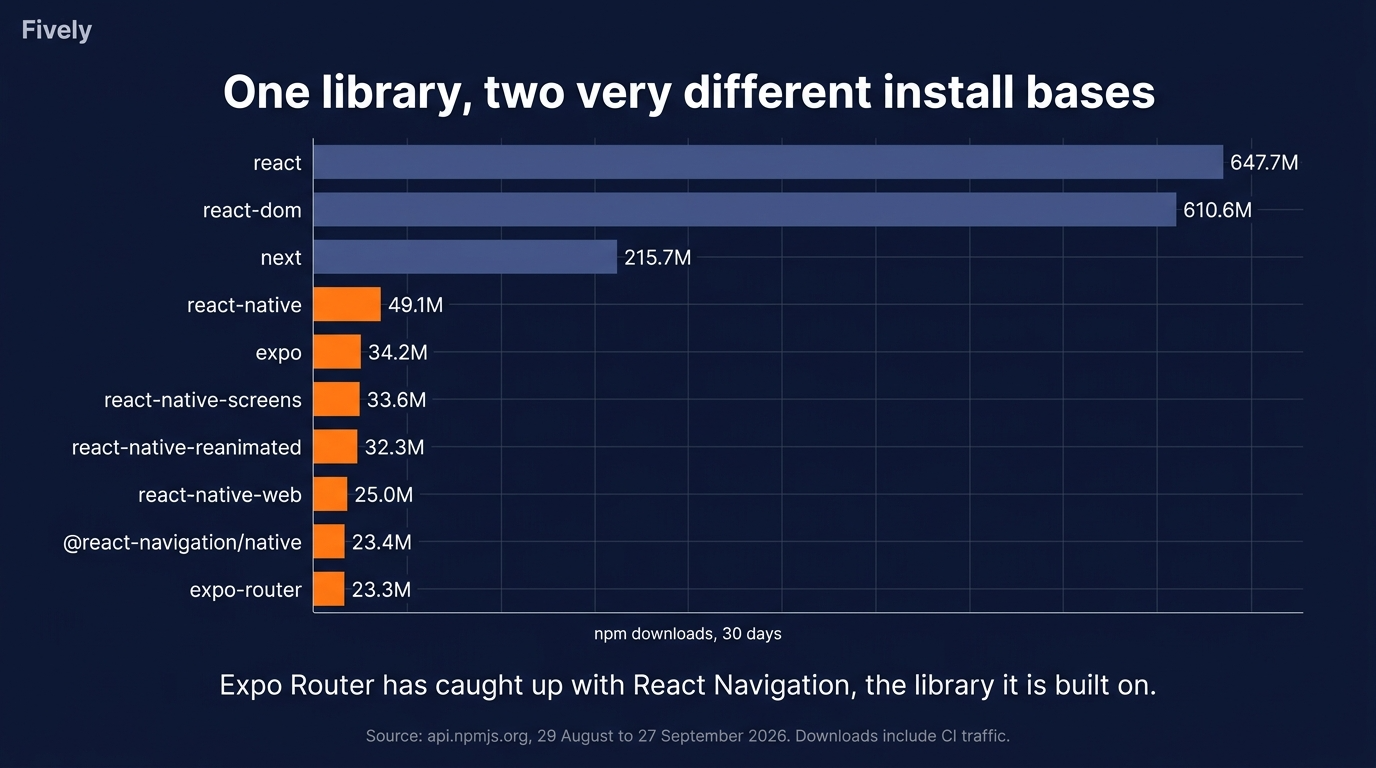
Mobile navigates by stacks, tabs and gestures. React Navigation has been the long-standing standard, and Expo Router adds file-based routing on top of it, borrowing the web’s mental model. Adoption shows how much that model appeals: in the 30 days to 27 September 2026, expo-router recorded about 23.3 million npm downloads against 23.4 million for @react-navigation/native. Deep links and state restoration still need deliberate work on mobile.
Verdict: React has the simpler model, because the browser does half the job. React Native has closed much of the gap with Expo Router, which lets web developers carry their routing habits across.
For example, event-planning platform Partiful uses Expo Router to enable deep linking between its website and mobile app, allowing users to open shared event invitations directly in their preferred platform.
6. Libraries, Tooling and Ecosystem
Both routing stories rely on libraries rather than the core, which says a lot about how each ecosystem is organised.
React’s ecosystem is the largest in front-end development: in the same 30-day window, react recorded about 648 million npm downloads and Next.js 216 million.
React Native’s ecosystem is smaller but concentrated: about 49 million downloads for react-native and 34 million for expo. Much of its quality comes from a few organisations. Expo provides the framework and build service; Software Mansion maintains cornerstones such as Reanimated; Callstack and Microsoft contribute heavily. Tooling improves fast too: the 0.76 release made Metro, React Native’s bundler, resolve modules about 15 times faster.
The practical difference is native code. A web library is JavaScript all the way down. A React Native library may contain Swift, Kotlin, or C++, so its compatibility with your React Native version and the New Architecture matters more than its star count.
Verdict: React for sheer breadth. React Native’s ecosystem is narrower but healthy, and Expo now covers most of what a typical app needs without touching native code.
Bluesky demonstrates React Native’s mature ecosystem by combining Expo libraries for camera access, image picking, push notifications, and media handling in its production social networking app.
7. Testing, Debugging and Release Process
A rich ecosystem gets code written; getting it to users is a very different pipeline on each side.
A React web app is deployed like any website. Push a fix, and every user has it on their next page load. Unit testing with Jest or Vitest and end-to-end testing with Playwright are mature and fast.
A React Native app ships as a binary through the App Store and Google Play, and every release passes review. Testing adds device-level tools such as Detox or Maestro on real iOS and Android hardware, and the State of React Native 2025 results report that debugging, long the top complaint, has improved markedly.
Over-the-air updates soften the gate by sending JavaScript-only changes without a new binary. Microsoft retired App Center, and CodePush with it, on 31 March 2025, so Expo’s EAS Update is now the main path. The limit is Apple’s App Review Guideline 2.5.2, which forbids downloading code that changes features after review: over-the-air updates are for fixes, not for new functionality.
Verdict: React wins on release speed outright. React Native’s store gate is real, but over-the-air updates keep bug fixes almost as fast as on the web when used within the rules.
In June 2026, TeamReach migrated approximately 5 million users to its rebuilt Expo app and shipped 12 over-the-air updates in just three days to resolve post-launch issues without submitting new app binaries.
 Services Account
8. Security
Faster release paths also widen the attack surface, and 2025 made that concrete for React on the server.
On 3 December 2025, the React team disclosed CVE-2025-55182, rated CVSS 10.0: a flaw in how React Server Components deserialised requests allowed an unauthenticated attacker to achieve remote code execution on the server. It affected the react-server-dom packages from 19.0 to 19.2.0 and, through them, frameworks including Next.js and React Router, until patched releases followed. The lesson is structural: React is no longer only a client library, and server rendering puts it on your backend’s attack surface. On the client, JSX escaping still prevents most cross-site scripting, and React 19.3 added support for Trusted Types.
React Native carries a different risk: the JavaScript bundle ships inside the app, and anyone can extract it. Hermes bytecode makes it harder to read, not secret, so API keys never belong in the bundle, credentials belong in the iOS Keychain or Android Keystore, and over-the-air updates should be signed.
Both install dependencies from npm, so the supply chain risk is shared: in September 2025 a self-replicating worm compromised more than 500 npm packages before GitHub removed them.
Verdict: Different threats, similar discipline. React teams using server rendering must treat React as backend code and patch fast. React Native teams must assume the bundle is public.
Following the React2Shell vulnerability disclosure in December 2025, Cloudflare deployed emergency WAF protections and recorded approximately 582 million requests matching React2Shell-related security rules over eight days, demonstrating how quickly critical React vulnerabilities can attract attacks.
9. Community, Talent Pool and Popularity in 2026
Security depends on maintainers, and maintainers depend on the size and health of the community.
React remains the most used web framework among professional developers: 46.9% in the 2025 Stack Overflow Developer Survey, 44.7% of all respondents. React Native serves only mobile, so it is smaller by design. In the 2024 survey, the last to list mobile frameworks separately, it was at 8.4% of all respondents and 9% of professionals, against 9.4% for Flutter. npm tells a similar story at a larger scale: react is downloaded roughly 13 times as often as react-native.
The talent picture follows. Every React Native developer is a React developer; far from every React developer is ready for React Native, because the scarce skills are mobile-specific: native modules, build systems, store releases and device performance. Governance has never been more stable. Both projects belong to an independent foundation whose eight platinum members include Meta, Microsoft, Amazon, Vercel, Expo, Callstack and Software Mansion.
Verdict: React has the larger pool by an order of magnitude. React Native’s pool is smaller but draws on it, so the real hiring question is mobile depth, not framework familiarity.
In 2026, Photobucket partnered with Software Mansion to modernize its React Native app and train its existing React developers in mobile-specific skills, demonstrating the value of specialized expertise within the ecosystem.
10. AI-Assisted Development: How AI Changes the Trade-off
Popularity is lagging data. The force most likely to change these numbers next is already visible, and it cuts both ways.
On the web, AI app builders have standardised on React: as our guide to the best tech stack for vibe coding documents, v0, Lovable, and Bolt.new all generate React by default. Mobile is following through Expo: Bolt added an Expo integration in February 2025, and the Vercel AI SDK ships an official Expo guide for streaming chat interfaces.
The same force threatens React Native’s central argument. On 10 September 2026, Shopify, once its most prominent advocate, announced that its apps are moving to Swift and Kotlin. Its reasoning was specific: “agents have reduced the advantages of sharing implementation, while the advantages of building for each platform remain.” A core of six engineers rebuilt the Shop app natively in 12 weeks. Shopify was equally clear that “React Native apps can be fast. Ours are,” and InfoQ’s coverage noted community pushback, including the loss of over-the-air updates.
The balanced reading: AI makes writing code for a second platform cheaper, but not running two release pipelines, two QA passes, and two sets of store reviews. For a large company with dedicated iOS and Android teams, native has become more viable. For a small team shipping to both platforms, one codebase is still cheaper to operate.
Verdict: AI strengthens React on the web and makes React Native easier to build with, while weakening its cost advantage for large, well-staffed teams. For startups and mid-sized products, the case for React Native holds.
For example, Developer Andrei Covaciu used Bolt.new and Expo to build and launch BetAI Pro, a React Native mobile app with real payments, on the App Store in just two weeks, demonstrating how AI-assisted development accelerates cross-platform delivery.
Can You Use React and React Native Together?
Short answer: yes, sure! Many products need a web app and a mobile app, and a shared React foundation makes that cheaper than two unrelated codebases.
Pattern 1: Shared Logic in a Monorepo
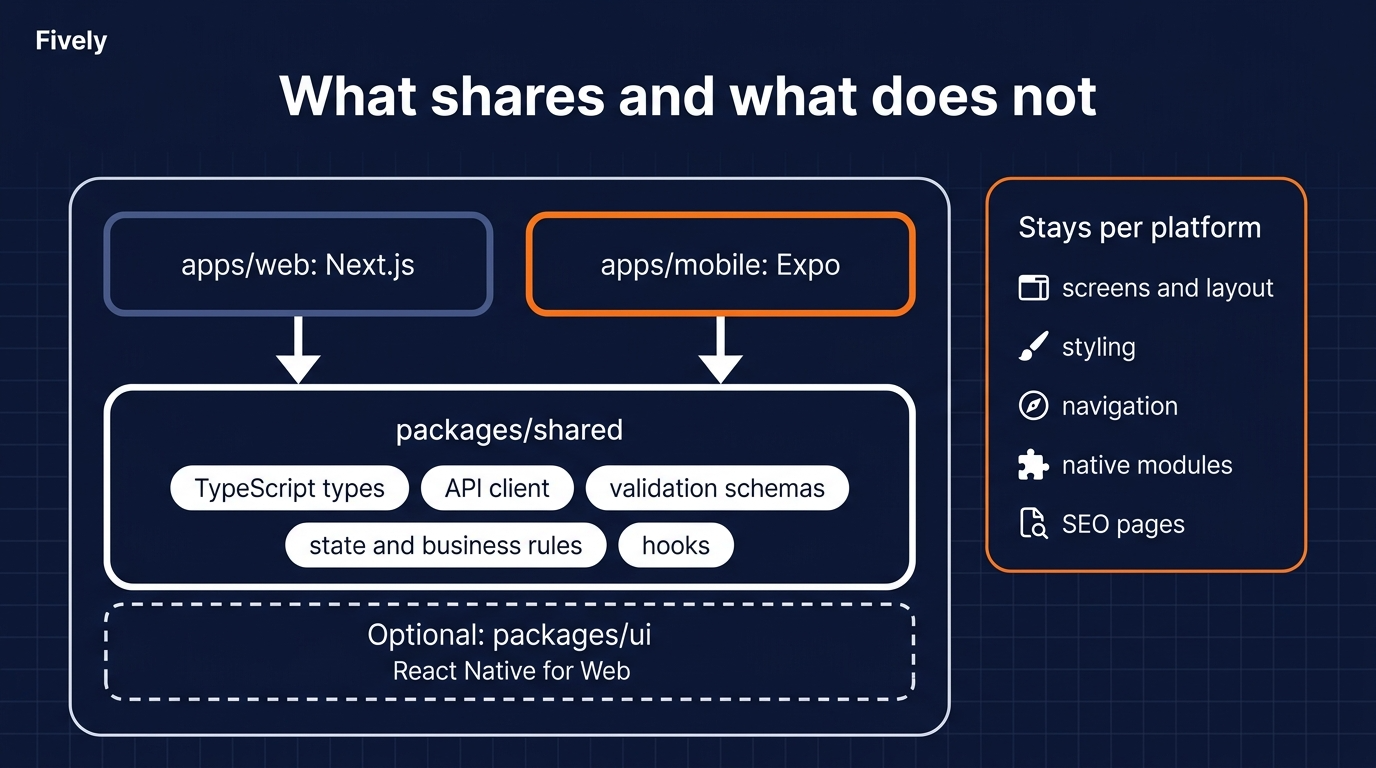
The conservative pattern keeps two separate front ends and shares everything beneath the interface. A monorepo managed with a tool such as Nx or Turborepo holds a Next.js web app, an Expo mobile app, and shared packages for TypeScript types, API clients, validation schemas, state management and business rules.
This is low-risk and widely used. Each interface stays idiomatic for its platform, while logic that must behave identically everywhere, such as pricing rules, permissions or validation, lives in exactly one place.
Pattern 2: One Codebase for Web and Mobile
Sharing logic keeps two apps. The more ambitious pattern aims for one. With Expo Router and React Native for Web, a single codebase can target iOS, Android, and the browser, rendering View and Text to HTML on the web. React Native for Web’s 25 million monthly downloads show this is well beyond an experiment.
It works best when the web version is essentially the app in a browser: dashboards, logged-in tools, companion experiences. It works poorly for SEO-heavy marketing sites, where web-native patterns, server rendering and CSS matter more than code reuse.
When Code Sharing Is Worth the Complexity
Both patterns cost something, so the question becomes when the cost is justified. Share code when at least two of these are true:
- The product genuinely needs both a web app and a mobile app, with the same core workflows on each.
- Business rules are complex enough that implementing them twice would invite drift and bugs.
- One team, or closely coordinated teams, will own both front ends.
- The web experience is an app behind a login rather than a search-driven marketing site.
Do not share for a first MVP that only needs one platform. Setting up a monorepo, build tooling, and platform-specific escape hatches will cost more time than it saves until the second app exists.
Decision Framework: Which One Fits Your Project
If sharing is the exception, the table below is the rule.
For a closer look at the mobile side of this choice, our guide to the best tech stack for mobile app development compares the wider field, including Flutter, Kotlin Multiplatform and fully native options.
Expo vs Bare React Native Workflow
Two rows in the table above point not just to React Native but to Expo, and the hardware-heavy row to native modules. Once you have chosen mobile, this is the last framework decision left, and it is less binary than its name suggests.
“Bare” used to mean ejecting from Expo and losing its tooling. Today the real line is who owns the iOS and Android directories. With Expo’s Continuous Native Generation, npx expo prebuild generates them on demand from app config and config plugins, so the team maintains a description of its native customisations rather than the native code itself. In a bare project, created with npx @react-native-community/cli init, those directories are committed and edited by hand in Xcode and Android Studio.
Choosing Expo no longer means accepting limits on native code. A development build is, in Expo’s words, “essentially your own version of Expo Go” that can run any native library, and the Expo Modules API supports the New Architecture. Expo SDK 58, released on 15 October 2026 with React Native 0.88, put Expo Modules 2.0 into beta. The genuinely limited tool is the Expo Go sandbox app, which Expo’s own docs call “limited and not useful for building production-grade projects”. Bare still wins where Expo’s documentation itself steps back: existing apps whose native code is managed by hand, and brownfield products that embed React Native inside an existing iOS or Android app.
Cost rarely decides it. Expo’s EAS cloud services are optional, since you can build locally or in your own CI. The free plan covers up to 15 Android and 15 iOS builds and over-the-air updates for 1,000 monthly active users, with a low-priority queue that can mean waits of 90 minutes or more at peak; paid plans start at $19 and $199 a month plus usage. The market has largely chosen anyway: in the 30 days to 18 October 2026, the expo package recorded about 42 million npm downloads against 58 million for react-native, a rough proxy since both include CI traffic.
Verdict: Start new apps on Expo with Continuous Native Generation and development builds, and add native code through config plugins or Expo Modules when needed. Go bare for brownfield integration, targets beyond iOS and Android, or a team that already lives in Xcode and Android Studio.
What It Costs to Build and Staff a React or React Native Team in 2026
We arranged the info in a table: every row below assumes you can staff the choice, which brings us to money. Region and seniority move the rate far more than the choice between React and React Native does.
Typical Hourly Rates by Region
These planning ranges come from our software development cost guide. React Native adds one cost driver, the premium for engineers who can work below the JavaScript layer: our offshore React Native guide puts offshore seniors at roughly $50–90 per hour and leads with deep iOS and Android expertise at $70–120+.
Typical Team Composition for Each Stack
Team shape changes the total more than the hourly rate does:
- React web app: one or two front-end developers, a designer, and a backend developer.
- React Native app: one or two React Native developers, a designer, a backend developer, and QA on real devices, with at least one engineer comfortable with native modules and store releases.
- Web and mobile together: a shared-logic core plus platform-focused developers on each side, with one technical owner for the monorepo.
The most common gap is mobile release experience in a team of strong web developers. Fively provides React developers and React Native engineers who join an existing team, and our breakdown of mobile app team structure covers which roles to add as a product grows.
React vs React Native: Which One Should You Choose?
With the architecture, the data, and the budget on the table, the decision comes down to two short lists of use cases.
Choose React If…
- Your product lives at a URL, and people find it through search.
- Users mainly work on desktop: dashboards, SaaS tools, admin panels.
- You need to ship changes many times a day without any review gate.
- Your MVP must validate demand as cheaply and quickly as possible.
- You want the widest possible hiring pool and library choice.
Choose React Native If…
- Your product belongs on phones and should feel like a real app.
- You need the camera, push notifications, biometrics, background location, or offline use.
- You want one codebase for iOS and Android with a small team.
- Your team already knows React, and you want to reuse that knowledge.
- You may later add a web version and want to share logic with it.
If both lists describe your product, that is not indecision. It is the shared-codebase case above, and it is where a React foundation pays off most.
Conclusion
React and React Native are not competitors; they are one idea aimed at two destinations. React is the natural choice for anything that lives in a browser. React Native is the most efficient way for most teams to ship a genuine iOS and Android app, and since the New Architecture, it no longer carries the caveats of its bridge era. AI adds the newest pressure: it strengthens React on the web and, for the largest teams, makes fully native apps easier to justify.
Fively builds on both. Our parking app case study shows a product built with React Native, React, and Node.js working together. If you are deciding between web, mobile, or both for a specific product, bring us the requirements, and we will tell you which way we would build it, and why.
 Services Account
Need Help With A Project?
Drop us a line, let’s arrange a discussion
Frequently Asked Questions
No, but it is built on React. Both use the same components, hooks, JSX and state model, so a React developer can read React Native code on day one. The difference between React and React Native is the output: React renders HTML in a browser, while React Native renders real iOS and Android views, so styling, navigation and release differ.
Yes. React Native for Web and Expo let you build applications for iOS, Android, and browsers using shared code. However, traditional React is usually the better choice for web-first projects.
Start with React to master components, hooks, state management, and JavaScript fundamentals. Once you're comfortable with React, learning React Native becomes much easier.
Yes. React Native can support secure fintech applications when combined with encrypted communication, biometric authentication, secure credential storage, and compliance with standards such as OWASP MASVS.
According to Upwork, React developers typically charge $20–$38 per hour, while React Native developers charge $24–$45. Actual costs depend on location, experience, and project complexity.
Partly. Business logic, TypeScript types, API clients, validation, and state can be shared directly, usually through a monorepo. Interface code cannot, because React Native has no HTML or CSS. With Expo Router and React Native for Web, you can target web and mobile from one codebase, which suits app-like products rather than SEO-driven sites.
For the large majority of apps, yes. Since the New Architecture replaced the bridge, React Native renders native views with synchronous access to native code, and Hermes improves start-up and memory. For products that depend on start-up time or device hardware, such as AR or on-device AI, native still sets the ceiling.
Rates depend more on region and seniority than on the framework: roughly $25–60 per hour in Asia, $35–75 in Latin America, $40–80 in Eastern Europe, $70–150 in Western Europe, and $100–200+ in North America. React Native engineers with deep native iOS and Android expertise command a premium over general React developers.
Start with the platform your first users are on. If the product can be validated in a browser, a React web app is the fastest and cheapest route. If the value only exists on a phone, go straight to React Native with Expo, covering iOS and Android with one small team. Add the second platform once demand is proven.


